Configuration Reference
AdamRMS includes a system-wide configuration panel that controls how your installation behaves. These settings are managed by server/platform administrators and affect all businesses and users on the installation.
Configuration values are stored in the database, but many can also fall back to environment variables if no database value has been set. This is particularly useful during initial setup or when deploying with Docker. The configuration page is accessible to server/platform administrators with the CONFIG:SET server permission via the server administration panel.
You can find the configuration menu by clicking Configuration at the bottom of the menu on the left of the screen.
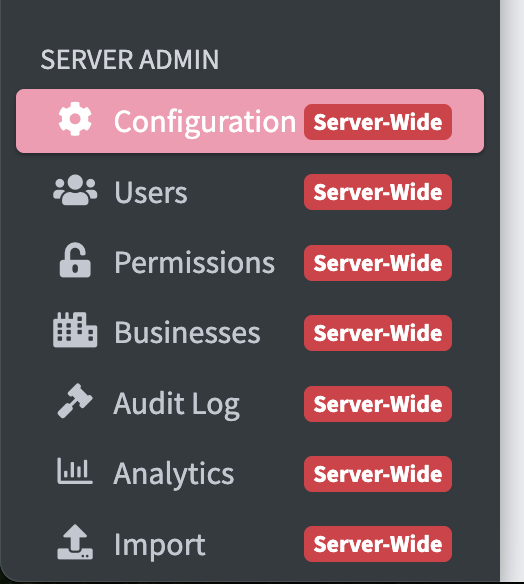
Can't find the configuration menu? If the menu does not appear, your account does not have the correct permissions to access it -- you must set your account as a server administrator.
Login to AdamRMS using the default super admin account (username username and the password password! -- make sure to change this) -- this account can access the configuration menu.
General
General settings control the core behaviour of your AdamRMS installation.
| Setting | Key | Type | Default | Required | Description |
|---|---|---|---|---|---|
| Root URL | ROOTURL | URL | Auto-detected from host | Yes | The URL of the site used as the point of reference for all links and emails. This is probably https://yourdomain.com or https://yourdomain.com/adamrms. Must not end in a trailing slash. |
| Timezone | TIMEZONE | Select | Europe/London | Yes | The timezone to use for AdamRMS. All standard IANA timezones are available. |
The Root URL is critically important. If it is misconfigured, it will prevent you from logging in. Double-check this value after any domain or proxy changes.
| Setting | Validation | Max Length | Min Length | Env Fallback |
|---|---|---|---|---|
| Root URL | Must be a valid URL | 255 | 10 | CONFIG_ROOTURL |
| Timezone | Must be a valid IANA timezone | 1000 | 1 | -- |
Email
Email settings control whether and how AdamRMS sends emails to users. When email is enabled, users will also be required to verify their email addresses on signup.
You will need to configure an email provider before enabling email sending. AdamRMS supports Sendgrid, Mailgun, Postmark, and SMTP. For more information on setting up email for a self-hosted installation, see the email setup documentation.
Core Email Settings
| Setting | Key | Type | Default | Required | Description |
|---|---|---|---|---|---|
| Email sending | EMAILS_ENABLED | Select | Disabled | No | Whether AdamRMS should send emails to users. If enabled, a provider must be configured below. |
| Email provider | EMAILS_PROVIDER | Select | Sendgrid | No | Which provider AdamRMS should use to send emails. Options: Sendgrid, Mailgun, Postmark, SMTP. Ignored if email sending is disabled. |
| From email address | EMAILS_FROMEMAIL | adamrms@example.com | No | The email address to send emails from. Must be a valid email address. | |
| Email Service API key | EMAILS_PROVIDERS_APIKEY | Secret | -- | No | The API key to use if Sendgrid, Mailgun, or Postmark is selected as the provider. |
| Email Footer | EMAILS_FOOTER | Text | AdamRMS default footer | No | Footer text appended to all outgoing emails. |
| Setting | Env Fallback |
|---|---|
| Email sending | CONFIG_EMAILS_ENABLED |
| Email provider | CONFIG_EMAILS_PROVIDER |
| From email address | CONFIG_EMAILS_FROM_EMAIL |
| Email Service API key | bCMS__SendGridAPIKEY |
| Email Footer | -- |
Mailgun Settings
| Setting | Key | Type | Default | Required | Description |
|---|---|---|---|---|---|
| Mailgun Server Location | EMAILS_PROVIDERS_MAILGUN_LOCATION | Select | -- | No | Whether to use US or EU Mailgun servers. Only relevant if Mailgun is selected as the provider. Options: US, EU. |
SMTP Settings
These settings are only used when SMTP is selected as the email provider.
| Setting | Key | Type | Default | Required | Description |
|---|---|---|---|---|---|
| SMTP server address | EMAILS_SMTP_SERVER | Text | smtp.example.com | No | The SMTP server hostname to send emails from. |
| SMTP server username | EMAILS_SMTP_USERNAME | Text | user@example.com | No | The username to connect to the SMTP server with. |
| SMTP server password | EMAILS_SMTP_PASSWORD | Secret | -- | No | The password to connect to the SMTP server with. |
| SMTP server port | EMAILS_SMTP_PORT | Number | 465 | No | The port to connect to the SMTP server on. |
| SMTP encryption type | EMAILS_SMTP_ENCRYPTION | Select | SSL | No | The encryption type to use when connecting to the SMTP server. Options: None, SSL, TLS. |
| Setting | Env Fallback |
|---|---|
| SMTP server address | CONFIG_EMAILS_SMTP_SERVER |
| SMTP server username | -- |
| SMTP server password | -- |
| SMTP server port | CONFIG_EMAILS_SMTP_PORT |
| SMTP encryption type | -- |
For most SMTP providers, SSL on port 465 is the recommended configuration. If your provider requires STARTTLS, select TLS and use port 587.
Error Handling
Settings for error tracking and reporting.
| Setting | Key | Type | Default | Required | Description |
|---|---|---|---|---|---|
| Sentry.io API key | ERRORS_PROVIDERS_SENTRY | Secret | -- | No | The Sentry.io API key for sending error logs. This is normally only used if you are developing AdamRMS. |
| Setting | Env Fallback |
|---|---|
| Sentry.io API key | bCMS__SENTRYLOGIN |
Security & Login
Settings that control user signup and authentication security.
| Setting | Key | Type | Default | Required | Description |
|---|---|---|---|---|---|
| User Signup | AUTH_SIGNUP_ENABLED | Select | Enabled | Yes | Whether new users can create an account. Disabling this means new users cannot sign up themselves. Options: Enabled, Disabled. |
| JWT Key | AUTH_JWTKey | Secret | Auto-generated (64 characters) | Yes | The key used for signing JWTs. Must be exactly 64 uppercase alphanumeric characters. If you are setting up AdamRMS for the first time, the generated default value will be fine. |
| Next password hashing algorithm | AUTH_NEXTHASH | Select | sha256 | No | The hashing algorithm to use for new passwords. Options: sha256, sha512. Changing this will not require users to change their passwords; the new algorithm is applied the next time a user changes their password. |
| Content Security Policy | CSP_ENABLED | Select | Disabled | No | Whether to send a Content-Security-Policy header with every page response. Enabling this improves security but may block uploads to storage providers whose endpoints are not in the built-in allowlist (e.g. custom Backblaze B2 or MinIO endpoints). Disable if you experience network errors when uploading files. Options: Enabled, Disabled. |
Changing the JWT Key will invalidate all existing user sessions. Users will need to log in again. Only change this if you have a specific reason to do so, such as a suspected security compromise.
If you are using a custom S3-compatible storage provider such as Backblaze B2 or MinIO and are seeing network errors when uploading files, ensure Content Security Policy is set to Disabled (the default).
| Setting | Validation | Env Fallback |
|---|---|---|
| User Signup | Must be Enabled or Disabled | CONFIG_SIGNUP_ENABLED |
| JWT Key | Exactly 64 characters, uppercase letters and digits only (A-Z, 0-9) | CONFIG_AUTH_JWTKey |
| Next password hashing algorithm | Must be sha256 or sha512 | -- |
| Content Security Policy | Must be Enabled or Disabled | CONFIG_CSP_ENABLED |
Authentication
Settings for configuring third-party OAuth authentication providers. These allow users to log in with their Google or Microsoft accounts.
Google Authentication
| Setting | Key | Type | Default | Required | Description |
|---|---|---|---|---|---|
| Google Auth Key | AUTH_PROVIDERS_GOOGLE_KEYS_ID | Text | -- | No | The ID key for Google authentication. |
| Google Auth Secret | AUTH_PROVIDERS_GOOGLE_KEYS_SECRET | Text | -- | No | The secret key for Google authentication. |
| Google Auth Scope | AUTH_PROVIDERS_GOOGLE_SCOPE | Text | https://www.googleapis.com/auth/userinfo.profile https://www.googleapis.com/auth/userinfo.email | No | The OAuth scope for Google authentication. You would only usually change this if you are developing AdamRMS. |
When configuring Google authentication, set the redirect URIs in the Google Cloud Console to:
https://YOURROOTURL/login/oauth/google.phphttps://YOURROOTURL/api/account/oauth-link/google.php
Replace YOURROOTURL with the value of your Root URL setting.
Microsoft Authentication
| Setting | Key | Type | Default | Required | Description |
|---|---|---|---|---|---|
| Microsoft Auth App ID | AUTH_PROVIDERS_MICROSOFT_APP_ID | Text | -- | No | The App ID key for Microsoft authentication. |
| Microsoft Auth Secret | AUTH_PROVIDERS_MICROSOFT_KEYS_SECRET | Text | -- | No | The secret key for Microsoft authentication. |
When configuring Microsoft authentication, set the redirect URIs in the Azure Portal to:
https://YOURROOTURL/login/oauth/microsoft.phphttps://YOURROOTURL/api/account/oauth-link/microsoft.php
Replace YOURROOTURL with the value of your Root URL setting.
Customisation
Settings to customise the appearance and branding of your AdamRMS installation.
| Setting | Key | Type | Default | Required | Description |
|---|---|---|---|---|---|
| Whitelabel project name override | PROJECT_NAME | Text | AdamRMS | No | What you call AdamRMS within your organisation. Must contain only letters, numbers, spaces, and underscores (2--20 characters). |
| User guide URL | LINKS_USERGUIDEURL | URL | https://adam-rms.com/docs/v1/user-guide/ | No | The URL of the user guide, linked to from the help buttons throughout the interface. |
| Support URL | LINKS_SUPPORTURL | URL | https://adam-rms.com/support/ | No | The URL for links to the support page. |
| Terms of service URL | LINKS_TERMSOFSERVICEURL | URL | -- | No | The URL to the terms of service page, linked from the login page. If not set, the link will not be shown. |
| Analytics Tracking Links | FOOTER_ANALYTICS | Text | -- | No | Code to insert into the footer of all pages, such as a Google Analytics tracking snippet. |
| Setting | Env Fallback |
|---|---|
| Whitelabel project name override | CONFIG_PROJECT_NAME |
| User guide URL | -- |
| Support URL | -- |
| Terms of service URL | -- |
| Analytics Tracking Links | -- |
If you are running AdamRMS as a white-label product for your organisation, set the Whitelabel project name override to your preferred name. This name will appear throughout the interface in place of "AdamRMS".
File Storage
AdamRMS uses AWS S3 (or S3-compatible storage) for file uploads. These settings must be configured before users can upload files such as asset images and project documents.
Core Storage Settings
| Setting | Key | Type | Default | Required | Description |
|---|---|---|---|---|---|
| File storage enabled | FILES_ENABLED | Select | Disabled | No | Whether S3 file storage is enabled. If disabled, users will not be able to upload files. Options: Enabled, Disabled. |
| AWS Server Key | AWS_S3_KEY | Text | -- | No | The AWS (or S3-compatible) access key. |
| AWS Server Secret Key | AWS_S3_SECRET | Text | -- | No | The AWS (or S3-compatible) secret key. |
| AWS S3 Bucket Name | AWS_S3_BUCKET | Text | -- | No | The name of the S3 bucket to store files in. |
| AWS S3 Bucket Region | AWS_S3_REGION | Text | us-east-1 | No | The AWS region of the S3 bucket. |
| Setting | Env Fallback |
|---|---|
| File storage enabled | -- |
| AWS Server Key | CONFIG_AWS_S3_KEY |
| AWS Server Secret Key | CONFIG_AWS_S3_SECRET |
| AWS S3 Bucket Name | CONFIG_AWS_S3_BUCKET |
| AWS S3 Bucket Region | CONFIG_AWS_S3_REGION |
Endpoint Settings
| Setting | Key | Type | Default | Required | Description |
|---|---|---|---|---|---|
| AWS S3 Bucket Browser Endpoint | AWS_S3_BROWSER_ENDPOINT | Text | https://s3.us-east-1.amazonaws.com | No | The S3 endpoint accessible over the internet for user browsers to upload files. |
| AWS S3 Bucket Server Endpoint | AWS_S3_SERVER_ENDPOINT | Text | https://s3.us-east-1.amazonaws.com | No | The S3 endpoint for the server to use for uploads. Almost always the same as the browser endpoint, except in specific circumstances such as Docker networking. |
| Path-style requests | AWS_S3_ENDPOINT_PATHSTYLE | Select | Disabled | No | Whether path-style requests should be sent to the upload endpoint. Should be disabled for almost all providers. Options: Enabled, Disabled. |
| Setting | Env Fallback |
|---|---|
| AWS S3 Bucket Browser Endpoint | CONFIG_AWS_S3_BROWSER_ENDPOINT |
| AWS S3 Bucket Server Endpoint | CONFIG_AWS_S3_SERVER_ENDPOINT |
| Path-style requests | CONFIG_AWS_S3_ENDPOINT_PATHSTYLE |
CloudFront CDN Settings
These settings configure an optional AWS CloudFront distribution for serving files. CloudFront is not required but can improve performance for users in different regions.
| Setting | Key | Type | Default | Required | Description |
|---|---|---|---|---|---|
| AWS CloudFront Enabled | AWS_CLOUDFRONT_ENABLED | Select | Disabled | No | Whether AWS CloudFront is enabled for file delivery. Options: Enabled, Disabled. |
| AWS CloudFront Private Key | AWS_CLOUDFRONT_PRIVATEKEY | Text | -- | No | The CloudFront private key for signed URLs. |
| AWS CloudFront Key Pair ID | AWS_CLOUDFRONT_KEYPAIRID | Text | -- | No | The CloudFront key pair ID. |
| AWS S3 CDN Endpoint | AWS_CLOUDFRONT_ENDPOINT | Text | -- | No | The CDN endpoint URL that users will access files from. This may be a CloudFront distribution URL or an alternative CDN. |
| Setting | Env Fallback |
|---|---|
| AWS CloudFront Enabled | -- |
| AWS CloudFront Private Key | -- |
| AWS CloudFront Key Pair ID | -- |
| AWS S3 CDN Endpoint | CONFIG_AWS_CLOUDFRONT_ENDPOINT |
Cloudflare Image Transformation
This optional setting enables Cloudflare Image Transformations for image files. When configured, image URLs are routed through Cloudflare's image transformation pipeline for automatic optimisation and caching. Non-image files are not affected.
| Setting | Key | Type | Default | Required | Description |
|---|---|---|---|---|---|
| Cloudflare Image Transformation Domain | CLOUDFLARE_IMAGE_TRANSFORM_DOMAIN | Text | -- | No | The domain for Cloudflare Image Transformations (e.g. https://cdn.yourdomain.com). When set, image files (jpg, jpeg, png, gif, webp, avif, svg, bmp, tiff, tif, ico) are served via Cloudflare's image transformation pipeline. |
| Setting | Env Fallback |
|---|---|
| Cloudflare Image Transformation Domain | CONFIG_CLOUDFLARE_IMAGE_TRANSFORM_DOMAIN |
If you are using an S3-compatible provider other than AWS (such as MinIO, DigitalOcean Spaces, or Backblaze B2), you may need to enable path-style requests and adjust the endpoint URLs accordingly.
Billing
Billing settings control how new instances (businesses) are created and whether Stripe billing integration is enabled.
| Setting | Key | Type | Default | Required | Description |
|---|---|---|---|---|---|
| Allow all users to create new instances | NEW_INSTANCE_ENABLED | Select | Enabled | No | Whether users can create new instances themselves, or whether this must be done by an administrator. Options: Enabled, Disabled. |
| Suspend new instances by default | NEW_INSTANCE_SUSPENDED | Select | Do not suspend | No | Whether newly created instances should be suspended by default. Useful for requiring administrator approval or a subscription before use. Options: Do not suspend, Suspended. |
| Reason for suspending new instances | NEW_INSTANCE_SUSPENDED_REASON_TYPE | Select | other | No | What AdamRMS should prompt users to do when their new instance is suspended. Options: noplan (prompt to set up a plan), billing (prompt to fix a billing issue via Stripe), other (show custom text). |
| Suspension reason for new instances | NEW_INSTANCE_SUSPENDED_REASON | Text | as no subscription has been chosen. | No | The reason shown to users when their new instance is suspended. Use this to explain what they need to do to get their instance activated. Max 180 characters. |
| Stripe Key | STRIPE_KEY | Text | -- | No | The Stripe API key for billing support. Leave blank to disable Stripe billing. Requires permissions for billing portal, prices, sessions, and products. |
| Stripe Webhook secret | STRIPE_WEBHOOK_SECRET | Text | -- | No | The secret key for verifying Stripe webhook events. |
If you enable Suspend new instances by default, make sure you also configure the suspension reason type and message so that users understand what action they need to take.
Telemetry
Telemetry settings control what information is sent to the Bithell Studios telemetry server. Telemetry helps the development team understand how AdamRMS is being used. For more details, see the telemetry privacy policy.
| Setting | Key | Type | Default | Required | Description |
|---|---|---|---|---|---|
| Reduce Telemetry collected | TELEMETRY_MODE | Select | Standard | No | The level of telemetry collected. When set to Limited, this reduces the information sent to the telemetry server (e.g. number of assets). Options: Standard, Limited. |
| Show this installation URL in list of installations | TELEMETRY_SHOW_URL | Select | Enabled | No | Whether the URL of this installation is shown publicly in the list of installations on the telemetry server. The installation is still counted in statistics even if disabled. Options: Enabled, Disabled. |
| Telemetry Installation Notes | TELEMETRY_NOTES | Text | -- | No | A note shown on the public telemetry dashboard to associate with this installation (e.g. the name of the main business). Only shown publicly if "Show URL" is enabled. Max 255 characters. |
| Telemetry NanoID | TELEMETRY_NANOID | Text | Auto-generated (21 characters) | Yes | A unique identifier for this installation on the telemetry server. Changing this will create a new entry on the telemetry server. Must be exactly 21 characters. |
The Telemetry NanoID is automatically generated during setup. You should not normally need to change it. If you do change it, the telemetry server will treat this as a new installation.
Environment Variable Fallbacks
Many configuration values can be set via environment variables as a fallback when no value exists in the database. This is particularly useful for initial deployment and containerised setups. The table below provides a quick reference of all available environment variable fallbacks.
| Config Key | Environment Variable |
|---|---|
ROOTURL | CONFIG_ROOTURL |
EMAILS_ENABLED | CONFIG_EMAILS_ENABLED |
EMAILS_PROVIDER | CONFIG_EMAILS_PROVIDER |
EMAILS_FROMEMAIL | CONFIG_EMAILS_FROM_EMAIL |
EMAILS_PROVIDERS_APIKEY | bCMS__SendGridAPIKEY |
EMAILS_SMTP_SERVER | CONFIG_EMAILS_SMTP_SERVER |
EMAILS_SMTP_PORT | CONFIG_EMAILS_SMTP_PORT |
ERRORS_PROVIDERS_SENTRY | bCMS__SENTRYLOGIN |
AUTH_SIGNUP_ENABLED | CONFIG_SIGNUP_ENABLED |
AUTH_JWTKey | CONFIG_AUTH_JWTKey |
PROJECT_NAME | CONFIG_PROJECT_NAME |
AWS_S3_KEY | CONFIG_AWS_S3_KEY |
AWS_S3_SECRET | CONFIG_AWS_S3_SECRET |
AWS_S3_BUCKET | CONFIG_AWS_S3_BUCKET |
AWS_S3_BROWSER_ENDPOINT | CONFIG_AWS_S3_BROWSER_ENDPOINT |
AWS_S3_SERVER_ENDPOINT | CONFIG_AWS_S3_SERVER_ENDPOINT |
AWS_S3_ENDPOINT_PATHSTYLE | CONFIG_AWS_S3_ENDPOINT_PATHSTYLE |
AWS_S3_REGION | CONFIG_AWS_S3_REGION |
AWS_CLOUDFRONT_ENDPOINT | CONFIG_AWS_CLOUDFRONT_ENDPOINT |
CLOUDFLARE_IMAGE_TRANSFORM_DOMAIN | CONFIG_CLOUDFLARE_IMAGE_TRANSFORM_DOMAIN |